
How to Take the Perfect Selfie for Color Analysis
If you’ve ever tried an online color analysis and thought, “Hmm… those shades don’t look like me,” chances are the photo you used wasn’t giving your colors the best chance to shine. Your personal color palette is all about how your skin, hair, and eyes play with different shades. For our AI to work its magic, it needs selfies that show your true colors — literally. Here’s how to snap the perfect shot for the most spot-on results
7/28/20251 min read
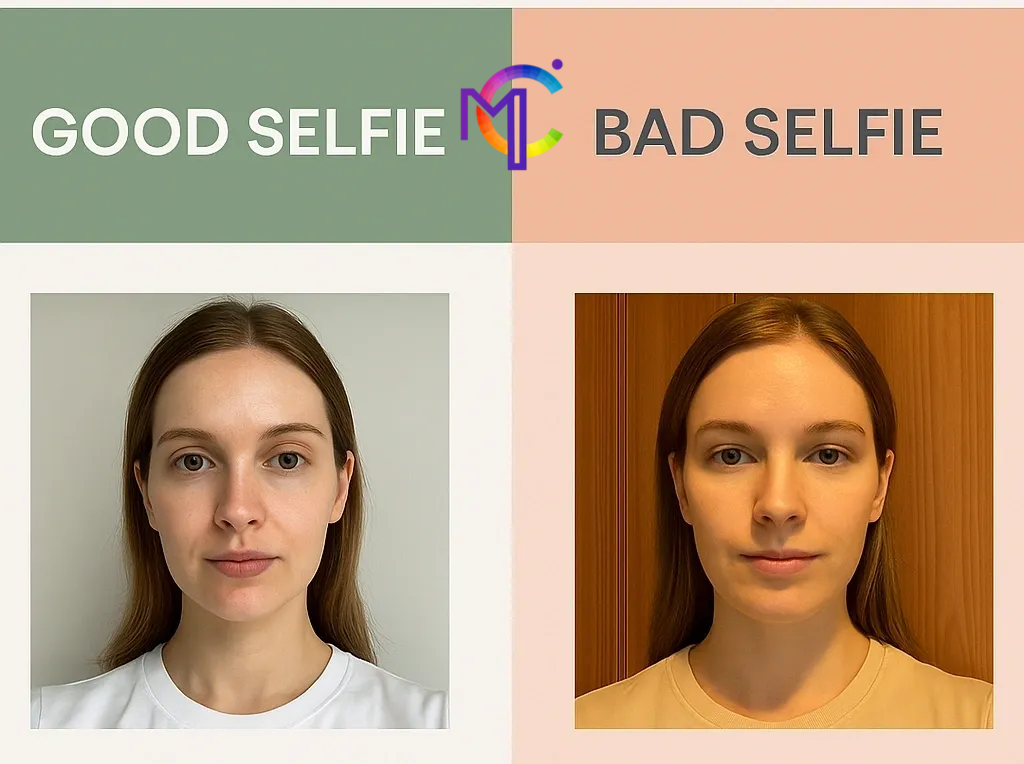
1. Find your light (but skip the spotlight)
Natural light is your BFF. Stand near a window or go outside on a cloudy day — it’s the most flattering and accurate for showing undertones.
❌ Harsh midday sun will wash you out.
❌ Yellow indoor bulbs can make you look warmer than you are.
✅ Soft, even daylight = chef’s kiss.
2. Keep your background simple
Your wall is not auditioning for the palette — you are.
Go for a plain, neutral background (white, grey, beige).
Avoid bright or colorful backdrops that could throw off the AI.
3. No makeup? Even better.
We know — this feels scary for some. But foundation, bronzer, and even lipstick can shift your natural tones. For the most accurate match:
Go makeup-free, or keep it super minimal.
Skip colored contact lenses.
4. Wear a neutral top
Your shirt’s color reflects onto your face — it matters more than you think.
Stick to white, grey, beige, or black.
Avoid scarves or jewelry near your face.
5. Hold steady, face forward
We need to see your full face in focus.
Camera at eye level, about arm’s length away.
Relax your face — no need for a model pose.
Keep your hair away from your face so we can see skin clearly.
6. Give us variety
MaiColors lets you upload 3 selfies or more. Make them count:
Different angles (front, slight left, slight right).
A couple in different natural light spots if possible.